

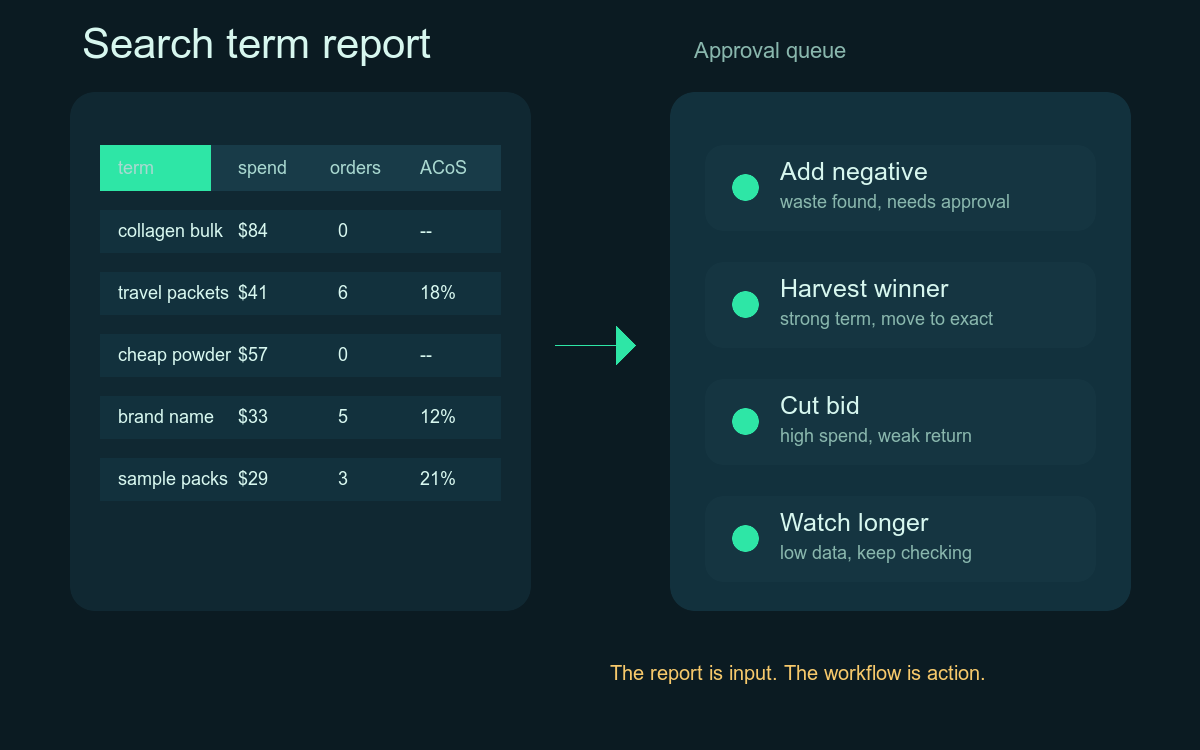
An Amazon search term report is three different jobs stacked into one spreadsheet: waste control, winner harvesting, and pattern detection. Treating them as one is why weekly PPC review feels like drowning. Here is how to separate them — and how Clair runs each one.
Most Amazon operators treat the search term report as one task: download it, scan rows, add some negatives, maybe promote a winner, close the tab.
That is why the work never feels finished.
The report is not one job. It is three jobs stacked into one spreadsheet:
- Waste control — stopping spend that will not convert.
- Winner harvesting — promoting search terms into structured keywords.
- Pattern detection — reading what shoppers reveal about your listing, competitors, and category.
Each job has a different cadence, a different decision rule, and a different risk profile. When you run them as one pass over a CSV, they fight each other. You miss winners because you are hunting waste. You miss patterns because you are tagging negatives. You over-negate launch campaigns because your rule was written for mature SKUs.
This post breaks the report into those three jobs, gives concrete decision rules for each, and shows how Clair's agents — Leo for PPC and a separate listing agent for content patterns — run them in parallel without losing the human approval step.
| Job | Cadence | Trigger | Output | Approval |
|---|---|---|---|---|
| Waste control | Daily | Zero-conversion spend, irrelevant intent, cannibalization | Negative keywords (exact or phrase) | Batch approve |
| Winner harvesting | Weekly | Strong CVR with sustained orders in broad or auto campaigns | New exact keyword plus paired negative in source | Per-action review |
| Pattern detection | Monthly | Growing semantic clusters of unmatched intent | Brief for listing, brand, or product team | No approval. Route only. |
The Anatomy of a Search Term Report
Before the jobs, the columns. Amazon's Sponsored Products search term report gives you, per row:
- Customer Search Term — what the shopper actually typed.
- Campaign Name, Ad Group, Targeting — where the term was matched.
- Match Type — broad, phrase, exact, or auto (close, loose, substitutes, complements).
- Impressions, Clicks, CTR
- Spend, 7-Day Total Sales, ACoS, ROAS
- 7-Day Total Orders, Units, Conversion Rate
The key distinction every operator forgets: the keyword is what you bid on, the search term is what the shopper typed. A single broad-match keyword like `collagen powder` can spawn hundreds of search terms — `collagen powder for joints`, `collagen powder unflavored bulk`, `vital proteins dupe`, `is collagen powder safe during pregnancy`, and so on.
That fan-out is the entire point. The report exists so you can decide, term by term, what to do about that fan-out. The three jobs are three different ways of deciding.
Job 1: Waste Control
Waste control is the job most teams default to. The output is a list of negative keywords.
The naive rule — "if ACoS is high, add a negative" — fails constantly. A term with 60% ACoS on a 70%-margin product is profitable. A term with zero orders and three clicks is not statistically waste. A high-ACoS term that drives organic rank during a launch is an investment, not waste.
A better rule set looks like this:
- Zero-conversion waste: clicks ≥ 2× your average orders-per-click for that SKU, AND orders = 0, AND spend ≥ target CPA. Action: negative exact.
- Irrelevant intent: the term contains a clear non-match token (competitor brand you cannot legally target, wrong size, wrong use case, wrong gender, "free," "cheap," "how to make"). Action: negative phrase on the disqualifying token.
- Cannibalizing terms: the term is already covered by an exact-match keyword in another campaign and is leaking through a broad/auto. Action: negative exact in the source campaign, not the destination.
- Under-sampled: clicks below the threshold above. Action: none. Watch list only.
The last rule is the one most operators violate. Negating an under-sampled term is how you kill a future winner before it gets a chance to convert.
Waste control has one more wrinkle: the right scope of the negative. A negative exact only blocks one phrasing. A negative phrase blocks the entire family. Use negative phrase when the disqualifier is a token (`kids`, `for dogs`, `recipe`). Use negative exact when the specific phrasing is the only problem.
In Clair, this job runs continuously inside Leo, the PPC agent. Leo pulls search term data on a schedule, tags every row against the rules above using the seller's actual margin, CPA target, campaign stage, and inventory state, decides scope (exact vs phrase, source campaign vs destination), and drafts the negative in the Ads API. The seller sees a queue with the term, the reason, the scope, the projected savings, and a single approve button. Nothing pushes to Amazon until that click.
Job 2: Winner Harvesting
Winner harvesting is the opposite job. The output is new exact-match keywords, often in new ad groups or campaigns.
The goal is to take search terms that are already converting inside a broad or auto campaign and give them their own bid, their own budget, and their own structure. This is how you compound on demand you have already discovered.
The decision rule:
- Order threshold: the term has ≥ 3 orders in the lookback window (lower for low-volume categories, higher for high-volume). Below this, you are harvesting noise.
- Conversion rate floor: the term converts at or above the account's median CVR. A term that drives orders but at half the CVR of your other keywords usually means the broad match is doing the heavy lifting, not the term itself.
- Source campaign type: harvesting from autos and broads is high-value. Harvesting from existing exacts is double-counting.
- Branded vs non-branded: branded harvests go to a dedicated branded campaign with its own bid logic. Mixing them inflates non-branded ROAS and hides real efficiency.
When the term qualifies, the action has three parts:
- Add the term as a negative exact in the source campaign so the broad/auto stops spending on it.
- Add the term as an exact-match keyword in the destination campaign with a bid derived from the term's historical CPC, not the broad's keyword bid.
- Tag it for follow-up so you can check, two weeks later, whether the harvested keyword is performing in isolation or whether it was riding on broad-match momentum.
The negative-in-source step is the one most operators skip. Without it, you pay twice for the same impression and your spend reports lie to you.
Leo runs winner harvesting end-to-end. He identifies candidates against the seller's thresholds, picks the destination campaign and starting bid based on the SKU's stage and the keyword's competitive density, and queues the paired action — negative in source plus new keyword in destination — as a single approval, so the seller cannot accidentally approve one half and forget the other.
Job 3: Pattern Detection
Pattern detection is the job no one schedules and everyone needs.
Search terms are unfiltered shopper language. Read enough of them and you find things the keyword tool cannot tell you:
- Use cases you do not list. A protein powder seller sees `protein powder for bariatric patients` showing up across multiple campaigns. The listing never mentions bariatric. That is a listing gap, not a PPC decision.
- Competitor names. Frequent searches for a specific competitor brand mean shoppers are comparing. Sometimes the answer is a comparison page on your DTC site, not a bid change.
- Bundle and accessory demand. Searches for `X with Y` reveal cross-sell opportunities or new variant ideas.
- Wrong-attribute matching. Lots of `unflavored` searches landing on a flavored SKU means the listing language is overreaching.
- Seasonality and event language. Searches that spike around holidays, fitness events, or news cycles tell you when to lean in on budget.
Pattern detection does not produce a PPC action. It produces a brief for someone else — the listing owner, the brand lead, the product team, the social team. That is why it disappears. There is no place for it to go in a normal PPC review.
In Clair, pattern detection sits with the listing agent (or with Clair itself when the work is light). The agent clusters search terms by semantic similarity, surfaces clusters that are growing week over week, and writes a short note explaining what the cluster suggests. The note shows up in a different queue from the PPC actions, so it does not get buried under negatives. The seller decides whether to send it to a copywriter, a designer, or ignore it.
Why the Three-Jobs Split Matters Operationally
When you fuse the three jobs into one weekly CSV review, four things go wrong:
- Cadence mismatch. Waste control should run daily on high-spend accounts. Winner harvesting works on a weekly or biweekly cadence — you need enough sample. Pattern detection works on a monthly cadence — patterns need time to form. A single weekly pass is too slow for the first job and too fast for the third.
- Decision-rule collision. A term can be a waste candidate AND a pattern signal at the same time (negate it for spend, but write it down because it reveals a listing gap). One spreadsheet pass forces you to pick one verdict.
- Context loss. By the time you scroll to row 800, you have forgotten what the rule was on row 80.
- Audit decay. No one remembers why a specific negative was added six months ago, so no one removes it when conditions change.
Splitting the work also splits the approval model. Negatives are reversible and low-stakes — approve in batches. Harvests move money and need per-action review. Pattern notes need no approval at all; they are just shared with whoever owns the next step.
What Clair Replaces in This Workflow
This is the part of PPC management that does not scale with headcount. An analyst can review one brand's search terms well. The same analyst reviewing fifty brands will miss things — not because they are careless, but because the work is dense and the cadence is wrong.
Clair is built to sit between Amazon's data and Amazon's execution layer. Each agent owns a function end-to-end. Leo handles PPC — querying search term data, applying the seller's actual rules (margin, CPA, campaign stage, inventory state, ranking strategy), and drafting actions in the Ads API. A separate listing agent handles content and pattern work. Clair routes between them and holds the approval queue. Nothing executes on Amazon without an explicit approve click.
Approval queue · Search terms
3 pending
unflavored collagen powder bulk
Leo · PPC47 clicks, 0 orders across 14 days. Spend crossed $184 with no conversion. Match source is broad in SP_Collagen_Auto.
collagen peptides travel packets
Leo · PPCCVR 11.4% vs account median 6.2%. 9 orders in 21 days from SP_Collagen_Auto. Below current exact coverage.
protein powder for bariatric patients
Listing · ContentGrowing cluster of 38 unique terms, +62% week over week. Listing copy does not mention bariatric use case.
Clair's agents are organized by function. Leo owns PPC end to end. A separate listing agent owns content patterns. Each agent queries data, applies your rules, and proposes actions. Nothing reaches Amazon without an approve click.
The seller's job shrinks to the part only a human can do: judgment. Is this term worth protecting because we are ranking on it? Is this harvest too aggressive given inventory? Does this pattern justify a listing rewrite? Those decisions stay with the operator. Everything before the decision — the pull, the join, the filter, the rule check, the API draft — happens before they open the queue.
That is why our customers see 17% lower TACoS and 22% higher CTR without adding analysts. The work did not disappear. The scanning did.
A Practical Way to Start
If you want to apply the three-jobs split without changing tools today, do this:
- Separate your weekly review into three passes. First pass: waste only, against an explicit rule set you write down. Second pass: harvests only, with the paired-action rule. Third pass: skim for patterns and write a one-paragraph note.
- Write down your thresholds. Click count for waste, order count for harvests, CPA target by SKU. If the threshold lives only in someone's head, it changes every week.
- Keep an audit log. Term, action, reason, date, approver. Six months from now you will need it.
- Set a cadence per job. Daily, weekly, monthly. Stop trying to do all three in one sitting.
When the manual version of this gets painful — and it will, somewhere around brand number five or SKU number fifty — that is when an operating layer earns its keep.
Sign up to use Clair's autonomous agents to monitor PPC, propose actions, and keep you in control.